Getting started
Record your card’s serial number and keep it in a safe place or register your card for free. This is very important! You will need your serial number to report any problems or to verify ownership if it is lost or stolen. If your card is not registered or you didn't record the card's serial number, we can't replace your card. Read Metro Transit's terms and conditions.
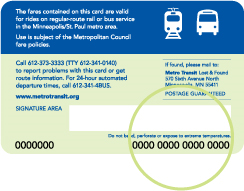
Your card is sturdy, but please follow these tips to keep your card protected from damage. Do not scratch, bend or punch a hole in your Go-To Card. The card will be deactivated if the sensitive wires inside it are broken or snapped. Don't hold your Go-To Card next to metal objects (coins, zippers) or electronic devices (cell phones or pagers) when using it. The metal may keep your card from being read properly.
Validate your ride on a bus
Touch your card to the Go-To logo as you board the bus. Otherwise, you risk a citation and/or removal from the bus.
Initially the display will show the current fare. After you validate the card, the display will show the remaining balance and when the transfer expires, if applicable.
If you have special requests – such as paying for more than one fare – please tell the driver before you touch your card.
NOTE: On METRO A, C, D, and Orange Line buses, pay your fare BEFORE you board. There are no Go-To Card readers or fareboxes on these buses.
Go-To Card reader
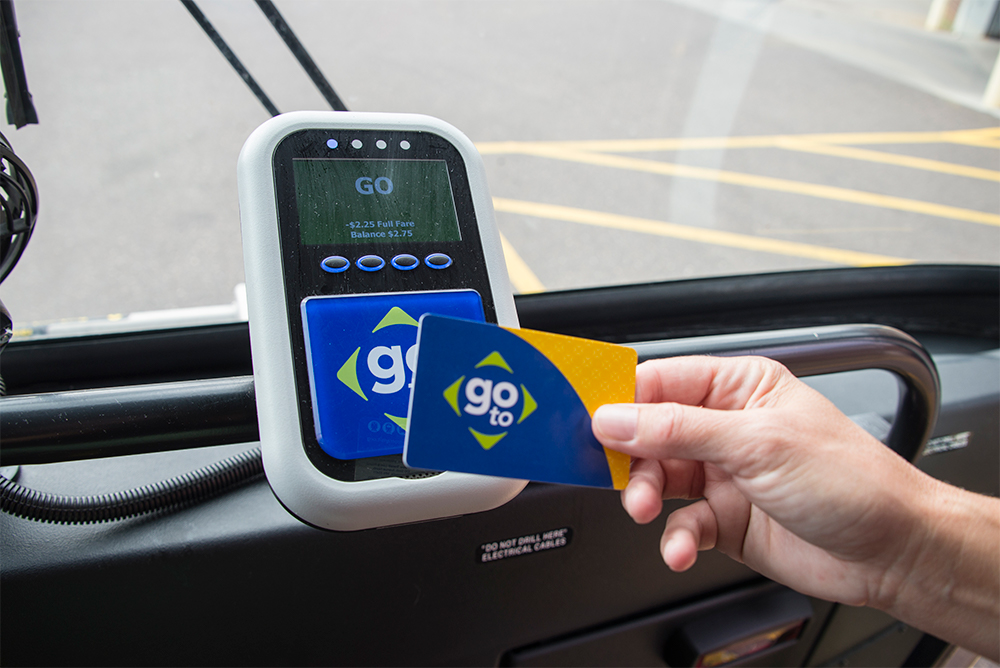
Where can I find the reader?

Validate your ride on METRO lines
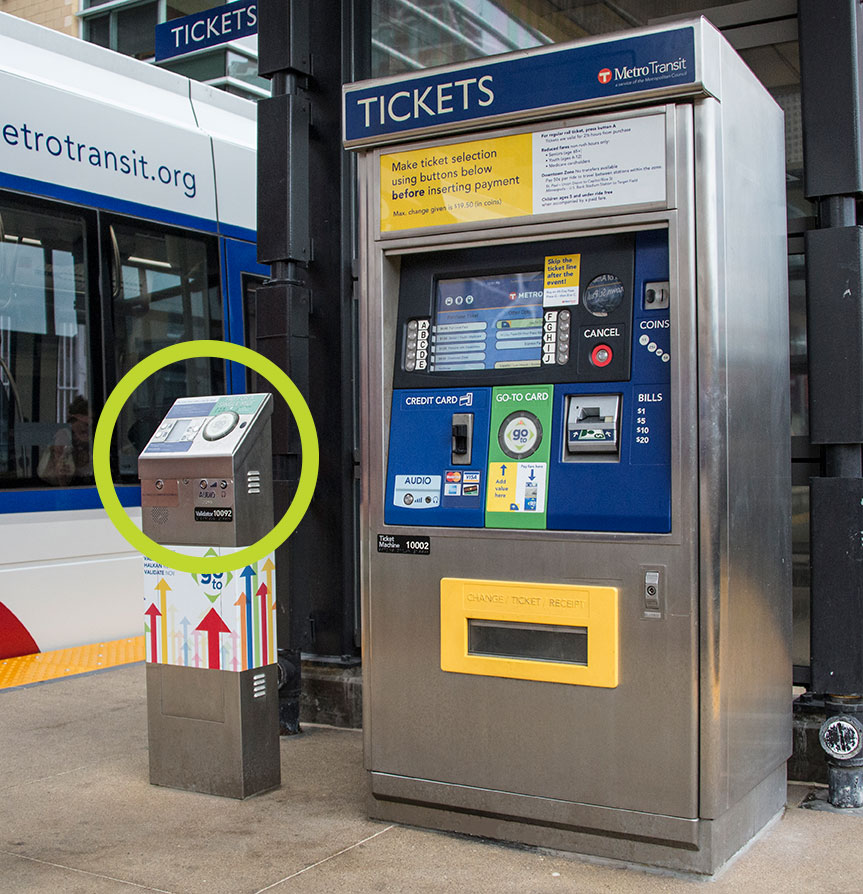
BEFORE YOU BOARD THE BUS OR LIGHT RAIL, touch your card to the Go-To logo on the reader at the station platform.
Initially, the display will show the current fare.
After you validate the card, the display will show the remaining balance and when the transfer expires, if applicable.
If you have special requests – such as paying for more than one fare – use the buttons and menu screen to the left of the Go-To circle prior to touching the card to the reader.
Go-To Card reader
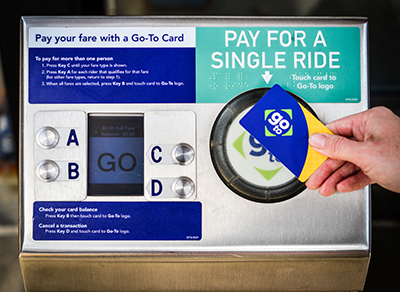
Where can I find the reader?
Indicator lights and what they mean
Every time you board a bus or train and touch your card to the reader, the indicator light will display green, yellow or red.
| Green |
Yellow |
Red |
 GO! GO!
|
 Warning Warning
|
 Use another form of payment Use another form of payment
|
|
Hop on and go!
When the reader beeps and the light displays GREEN, your fare was deducted.
The screen displays GO or TRANSFER and shows the amount that was deducted and the card’s remaining value or the expiration date of your pass.
|
If the reader beeps and the light displays YELLOW, your fare was deducted but your card has less than $10 of value remaining or your pass will expire in less than five days.
The screen displays GO and shows the amount that was deducted and the card’s remaining value. It’s time to add value!
|
If the reader emits a low tone and the light displays RED, your card has no remaining value, your pass has expired or there is a problem with your card. Please pay in cash. If you believe the card still has value, call Customer Relations (612-373-3333) or visit a Metro Transit service center to report the error. If you have a Universal Pass, Metropass, Student Pass, or College Pass, please contact the administrator at your employer or school before you contact Metro Transit. |
Transfers – good for unlimited rides at the same fare level for up to 2½ hours – are automatically added to your Go-To Card when you pay your fare. If you transfer to a bus with a higher fare, the difference will be automatically deducted from any stored value on your card. If your card has no stored value, you must pay the entire fare in cash. If you transfer from a bus to a train, you must touch your card to the rail station card reader before boarding.
Learn more about transfers.
Check your card's balance and add value to your card
Before you add value to your card, remember you can always check your card's balance online, at a card reader on a bus or light rail station platform or by phone.
Learn more about how value is added to your card
| Ways to Add Value |
Accepted Forms of Payment |
The Basics |
Value is available to use |
| Online |
Credit Card |
Enter your card's 16-digit number and payment information or access your account with saved information. Or sign up for Auto Refill!
|
24 hours later
|
|
By Phone
612-373-3333
|
Credit Card
|
Enter your card's 16-digit number and payment information.
|
24 hours later
|
|
Go-To Retail Outlet
|
Cash, Credit Card
|
Visit the Metro Transit store with card and payment.
|
Immediately |
|
Metro Transit Service Center
|
Cash, Credit Card, Commuter Check
|
Visit the Metro Transit store with your card and payment; ticket machines also available at Metro Transit Service Center locations.
|
Immediately |
|
METRO Ticket Machine
|
Cash, Credit Card
|
Press the F button (Go-To Card). Next, touch your Go-To Card to the Go-To logo below the screen. Select Add Stored Value or Add 7-Day or 31-Day Pass, then use the screen to choose the amount or type of pass you want to add. When the screen asks for payment, insert cash or a credit card. YOU MUST touch your Go-To Card to the Go-To logo one more time for stored value or a pass to be added to your card.
|
Immediately |
|
By Mail
|
Check, Credit Card,
Commuter Check
|
Complete the mail-order form and submit payment.
|
2-3 business days |
Traveling with others
If you have stored value on your card, you can pay for up to eight fares at once. It’s perfect for families or friends traveling together. If you’re paying for a bus ride for yourself and others, tell the driver BEFORE you touch your Go-To Card to the reader. If you have a pass and stored value on your Go-To Card, you may use the pass to pay for yourself. However, to pay for others, you must use stored value. Transfers for each person in your group are automatically embedded on your Go-To Card – no paper transfers will be issued. Your group must complete the trip together for transfers to be valid.
What to do if your card is lost, stolen or damaged
Lost or stolen cards
Contact Customer Relations at 612-373-3333 or visit a Metro Transit Service Center immediately so the card can be deactivated. If the card is registered, you will receive a replacement card that contains the same value that your original card had at the time it was reported lost, minus a $5 replacement fee.
If you have a Metropass, College Pass or U-Pass please contact the administrator at your employer or school. Ask for details about deactivating the card and ordering a replacement.
Non-functioning cards
If your Go-To Card or pass fails to work on a bus, use another form of payment. To receive a replacement card, contact Customer Relations at 612-373-3333 or visit a Metro Transit Service Center.
Cards reported lost or stolen are disabled and cannot be reactivated.
Frequently Asked Questions
Does the card have an expiration date?
Your card does automatically expire ten (10) years from the day it has been initialized; any remaining value can be transferred to a new card.
I have a multi-day pass and stored value on my card. Which one pays my fare?
The Go-To readers always use a pass first to pay the fare. If additional fare is required, the reader will automatically deduct the correct amount from any stored value on the card or pass. Learn more about the best fare product for you here.
What happens if my Go-To Card doesn’t have enough value to pay the fare?
We’ve got you covered. Say you have $1 remaining on your Go-To Card and board a bus with a $2 fare. When you touch your card to the reader, it will deduct the fare, leaving the card with a negative balance of $1. When you add value to the card, the $1 you owe will be deducted from the amount added to your card.
Note: Even with a negative balance, a transfer will be embedded on your Go-To Card so you can complete your trip. After the transfer expires you will not be able to use your Go-To Card again until you add value.
Can I purchase an All-Day Pass with my Go-To Card?
No. You can only purchase regular fares with the stored value on your Go-To Card. You can purchase an All-Day Pass at METRO ticket machines or from the Metro Transit app.
I've changed my personal information such as my email address. Where can I edit my card's registration information?
Edit your registration information to change your phone number, mailing address or e-mail address. You can also call Customer Relations at 612-373-3333. Metro Transit will not sell or disclose personal information without your written consent unless required to do so by law.
Contact us. We're here to help.
If you have questions, call Customer Relations at 612-373-3333.